Main
The starting point — general layer actions, trimming, time-stretch controls, and common effects, all one click away.
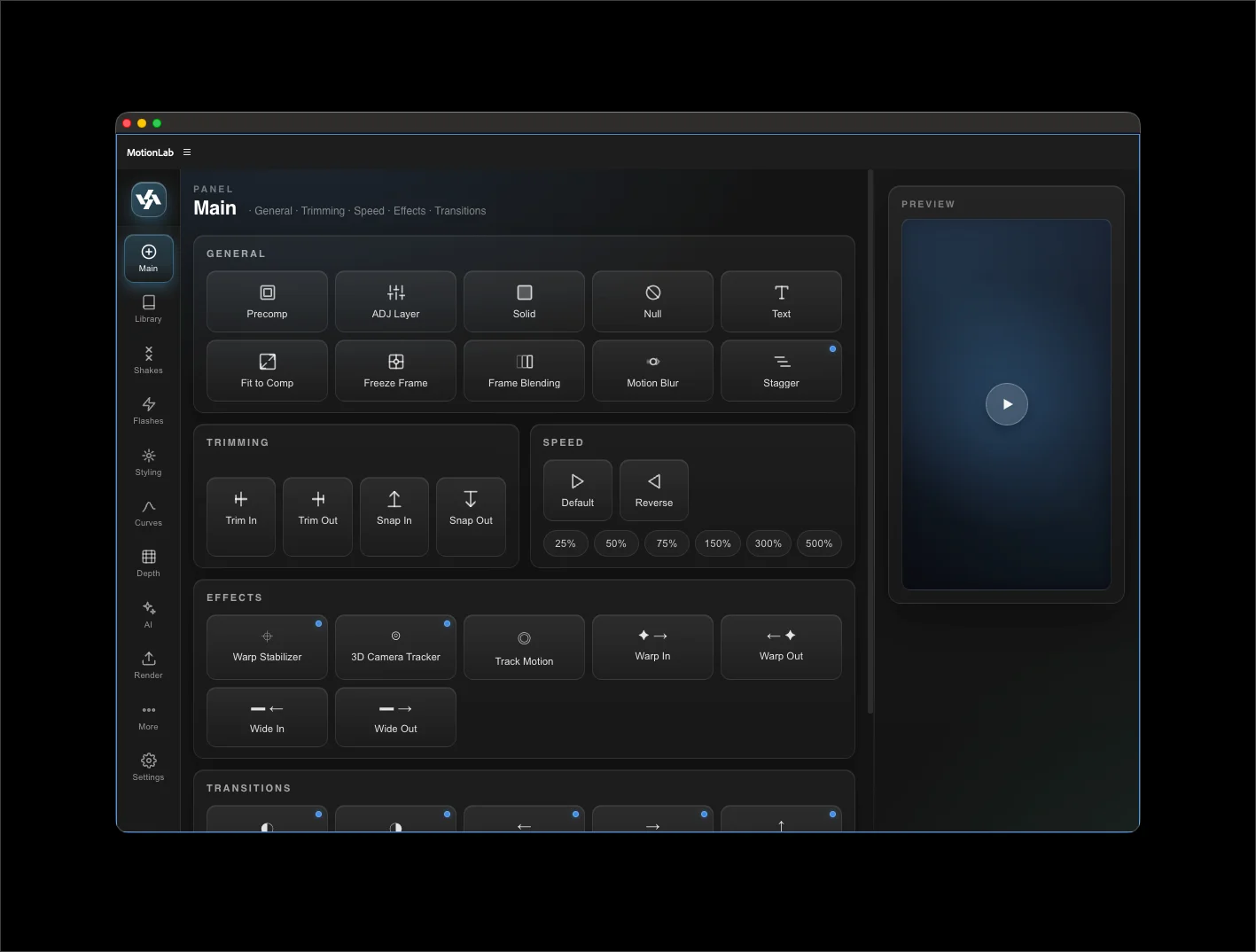
General actions
One-click buttons for the layer commands you reach for constantly. Each preserves the layer's timeline position and wraps in a single AE undo group.
- Pre-Compose — opens MotionLab's mirror of AE's native dialog with "Leave all attributes" / "Move all attributes" options and a checkbox to open the new comp. New comp inherits the layer label color set in Settings → Appearance → Layer Label Colors → Pre-Comp.
- Adjustment Layer — adds a comp-sized adjustment over the selected layer(s), spanning the combined visible range.
- Solid — adds a comp-sized solid in your accent color (configurable in Settings).
- Null — adds a null at the comp center.
- Text — adds an empty text layer ready to type into.
- Fit to Comp — scales the selected layer to fill the comp.
- Freeze Frame — freezes the layer at the playhead.
- Pixel Motion — toggles the selected layer's frame-blending mode to Pixel Motion.
- Motion Blur — toggles motion blur on the selected layer.
Speed controls
The Speed row sets the selected layer's time stretch to a target value, preserving the layer's visual start on the timeline.
- Default — sets stretch to 100%.
- Reverse — negates the current stretch (forward becomes reversed and vice versa).
- 25 / 50 / 75 / 150 / 300 / 500% — sets the absolute stretch value, preserving the current sign. If the layer is already reversed, it stays reversed at the new percentage.
Reversed layers
When a layer has negative stretch, its in-point and out-point on the timeline are swapped internally. MotionLab handles this consistently across the panel — speed changes, shakes, flashes, transitions, and adjustment layers all anchor to the visible start regardless of stretch direction.
Effects
One-click effect presets configured for typical use:
- Warp Stabilizer — opens param modal with method, smoothness, and crop options.
- 3D Camera Tracker — runs the tracker with sensible defaults; param modal exposes shot type and detail.
- Track Motion — sets up a single-point tracker.
- Warp In / Warp Out — directional warp transitions on the selected layer.
- Wide In / Wide Out — wider lens-warp variants.
Transitions have moved to their own Transitions tab.